Price
$9.99
Pickup
 
  
Delivery
 
 
From:
 
add to cart Image

Free returns on most items within 30 days.

Install it yourself with the Lutron Wiring Wizard.

A step-by-step interactive guide gives you the information you need to install your dimmer in about 15 minutes.

Get Started
A step-by-step interactive guide gives you the information you need to install your dimmer in about 15 minutes.

Product Overview

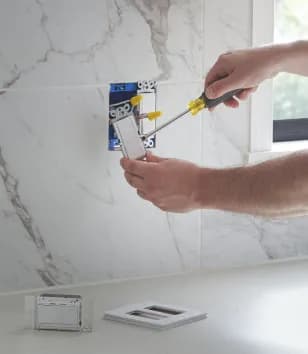
You will need a Lutron Pico wall plate bracket if you'd like to mount a Pico remote control directly to a wall, for an additional point of control when using a Caseta Wireless dimmer. You'll also need a wall plate bracket if you're replacing existing switches in a 3-way application (where lights have 2 or more wall switches) with a Caseta Wireless In-wall dimmer and a Pico remote control. Pico remote control and wall plate sold separately.
  • Mounts (1) Pico remote to your wall to add a point of control where you need one most
  • Create a 3-way application for your Caseta dimmer or switch; no wiring required
  • Replace existing switch by mounting over the backbox, or create a new point of control by mounting directly on almost any surface
  • Use with Lutron Claro wallplate (sold separately)
  • Includes (1) wallplate bracket; coordinating accessories sold separately

Specifications

  • Brand Name: Lutron
  • Sub Brand: Pico
  • Product Type: Fan Control Bracket
  • Built In WiFi: No
  • Color: WHITE
  • Height: 4.5 inch
  • Number in Package: 1 pack
  • Packaging Type: BOXED
  • Brand Name: Lutron
  • Switch Type: Remote
  • Wall Plate Included: No
  • Sub Brand: PICO
  • Smart-Enabled: Yes
  • Click here to see the Safety Data Sheets for this product.